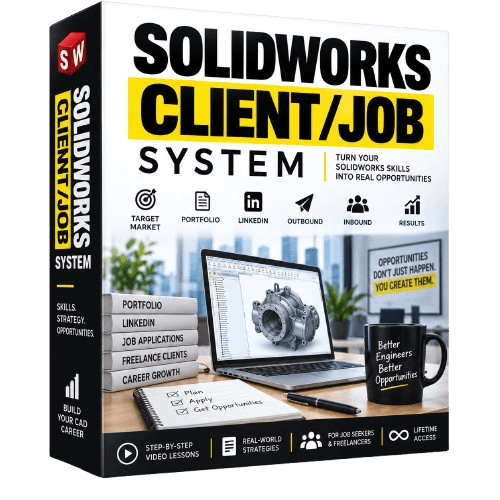
SolidWorks Client/Job System
Turn Your SOLIDWORKS Skills Into Real Career Opportunities: A Step-by-Step System to Help You Find SOLIDWORKS Jobs & Freelance Clients
Knowing SOLIDWORKS is valuable.
But knowing the software alone doesn't automatically bring you jobs, freelance clients, or career opportunities.
You also need to know:
How should you present your skills?
What should you put in your portfolio?
How do you make your LinkedIn profile stand out?
How do you actually find and approach potential employers or clients?
That's exactly what the SOLIDWORKS Client/Job System is designed to teach you.
Instead of randomly applying for jobs or waiting for someone to discover you, you'll build a clear system for positioning yourself, reaching the right people, and creating opportunities.
What's Inside?
MODULE 1: Introduction
Understand the complete Client/Job System and how the different pieces work together.
MODULE 2: Choosing Your Target Market
Stop trying to appeal to everyone.
Learn how to identify the specific companies, industries, employers, or potential clients you want to target.
MODULE 3: Building a Specific Portfolio
Learn how to create a portfolio around the type of opportunities you're actually looking for.
Instead of filling it with random models, you'll focus your portfolio on demonstrating relevant SOLIDWORKS skills and projects.
MODULE 4: Optimizing Your LinkedIn Profile
Your LinkedIn profile can be much more than an online CV.
You'll learn how to position your profile so that people immediately understand what you do, what skills you have, and what type of opportunities you're looking for.
MODULE 5: Outbound Strategy
Don't just wait for opportunities.
Learn how to proactively search for and reach out to potential employers and clients.
You'll build an outbound process you can consistently follow instead of sending random applications and hoping someone responds.
MODULE 6: Inbound Strategy
Outbound is about finding opportunities.
Inbound is about helping opportunities find you.
You'll learn how to build your presence and position your SOLIDWORKS skills so that you can start creating inbound interest over time.
MODULE 7: Running the System
Finally, you'll bring everything together into one repeatable system.
Target Market → Portfolio → LinkedIn → Outbound → Inbound → Repeat
Instead of wondering what you should do next, you'll have a process you can continue running consistently.
This Course Is For You If...
You know SOLIDWORKS but don't know how to turn that skill into opportunities.
You're looking for your first SOLIDWORKS job.
You want to start finding freelance CAD clients.
You've been applying for jobs but aren't getting enough responses.
You have a portfolio, but it's filled with random projects without a clear direction.
You want to use LinkedIn more effectively to build your career.
You don't want to simply wait and hope that opportunities eventually appear.
Stop Just Learning. Start Putting Your Skills to Work.
You may already have the SOLIDWORKS skills.
Now you need a system for showing those skills to the right people.
The SOLIDWORKS Client/Job System gives you a clear process to follow.
Choose your market.
Build the right portfolio.
Position yourself properly.
Reach out.
Build inbound visibility.
Run the system consistently.
Ready to Start Creating More Opportunities With Your SOLIDWORKS Skills?
HERE'S EVERYTHING YOU'RE GETTING TODAY
Module 1 — Introduction
Understand the complete SOLIDWORKS Client/Job System and how to use it.
Module 2 — Choosing Your Target Market
Identify the specific companies, industries, employers, or clients you want to target.
Module 3 — Building a Specific Portfolio
Build a portfolio designed around the type of work you actually want to get.
Module 4 — Optimizing Your LinkedIn Profile
Position your skills and experience so potential employers and clients immediately understand what you can offer.
Module 5 — Outbound Strategy
Learn how to proactively find and approach potential employers and freelance clients.
Module 6 — Inbound Strategy
Build your online presence so opportunities can start coming to you.
Module 7 — Running the System
Bring everything together into a simple, repeatable process you can run consistently.
TOTAL VALUE: $197
Get the complete SOLIDWORKS Client/Job System today for just:
$197
ONLY $17
ONE-TIME PAYMENT • LIFETIME ACCESS
Get instant LIFETIME access to all 7 modules and start building a system for finding SOLIDWORKS job opportunities and freelance clients.
SAVE $180 TODAY
TODAY ONLY: $17 ($197)
About the Instructor
Hi, I’m Alen Oletić — a SOLIDWORKS Certified Professional with a Master’s degree in Mechanical Engineering. Over the past 4 years, I’ve taught 50,000+ students how to confidently use SOLIDWORKS through my best-selling online courses.
I don’t just teach buttons — I teach you how to think like an engineer, build real-world parts, and create a portfolio that actually gets noticed. Whether you're preparing for certification, job interviews, or freelance work, I’ll help you focus on what truly matters — and skip the fluff.

©cadandengineeringschool
SOLIDWORKS is a registered trademark of Dassault Systemes SolidWorks Corporation and not related to cadandengineering.com. The intellectual property depicted in these 3D models are not affiliated with or endorsed by the original rights holders.